What should a QA engineer learn to become an AI QA Engineer?
A learning map in five stages: from what an LLM is to agents that turn acceptance criteria into test code.

AI is changing how software gets tested, and a lot of QA engineers ask the same question: where do I even start?
So I drew a map for QA and automation engineers. It starts at QA / AQA and ends at AI QA Engineer, with five stages in between:
- 01 Understand AI Learn the system first: LLMs, agents and MCP.
- 02 Control AI behavior Instructions and context: prompts, memory and the system prompt.
- 03 Trust, debug & diagnose Judgment for real work: hallucinations, flaky tests and root cause.
- 04 Build reliable QA agents Repeatable workflows: skills, hooks and custom agents.
- 05 Automate the QA lifecycle Apply it to your project: AC → test cases → test code.
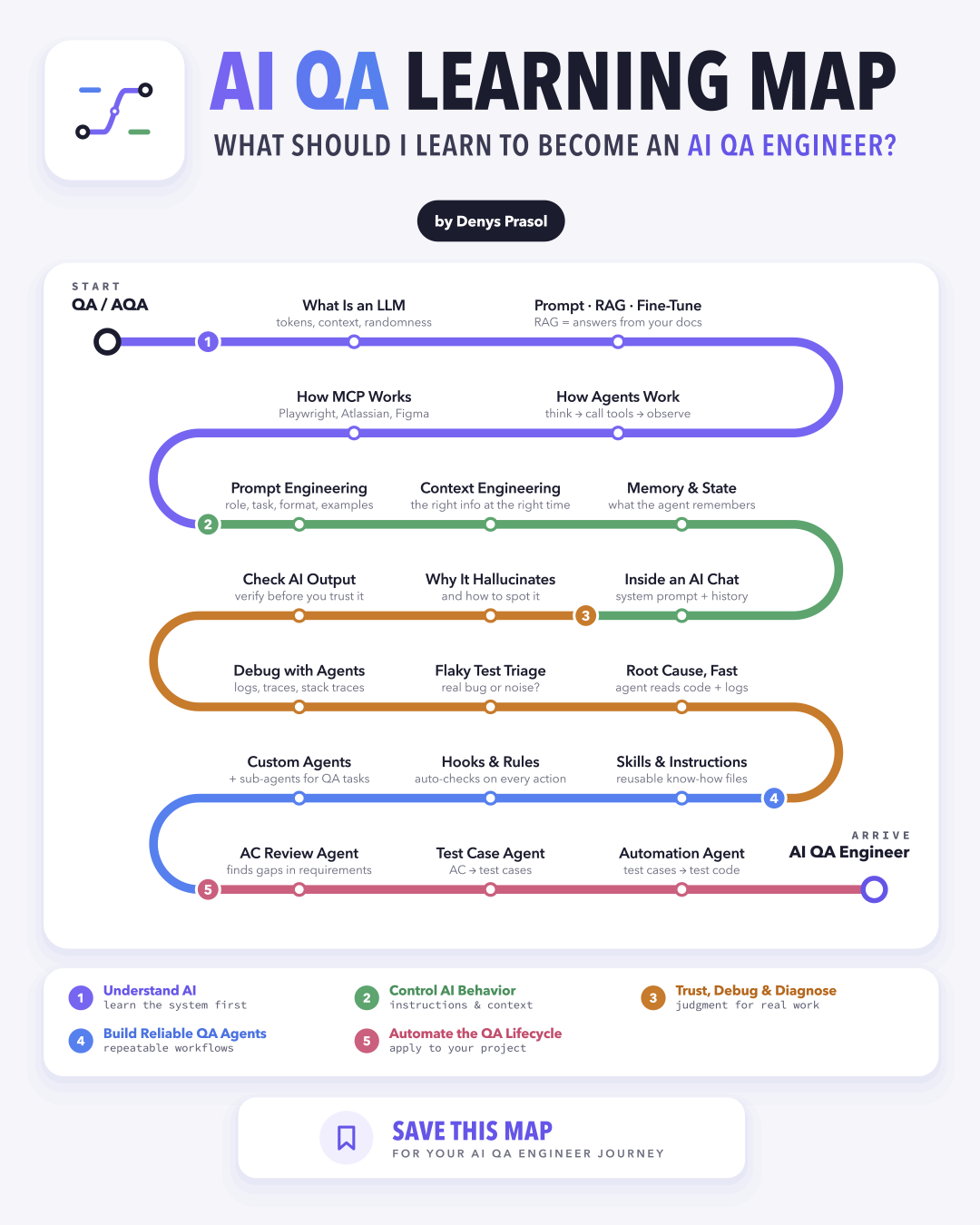
Here is every stop on the map, in the order the path goes.
1. Understand AI
Learn the system first.
What is an LLM
Tokens. A model doesn't read text the way we do. It splits it into tokens: small pieces like words, parts of words, and punctuation. "Ship fast, fix later" becomes something like ["Ship", " fast", ",", " fix", " later"]. A rough rule for English: one token is about three-quarters of a word. Images work the same way, only with pixels: the model cuts a picture into small square patches, and each patch becomes a token it uses to recognize what's in the image.
Context. The context window is how many tokens the model can keep in mind at once: the input, the conversation so far, any files you added, and the answer it's writing. It decides how long a conversation can go before the model starts forgetting details from the beginning. When an agent "forgets" your instructions halfway through a long session, this is usually why.
Randomness. A model doesn't look up one correct answer. For every next token, it weighs the options and picks one, with a bit of chance involved. That's why the same prompt can give you two different results. For a QA engineer, this is the big mindset shift: you can't assert on exact text. Review the structure, the facts, and the behavior, and run important prompts more than once.
Temperature. This is the setting that controls how much chance goes into that pick. A low temperature, close to 0, almost always takes the most likely token, so answers are focused and repeatable: good for test cases, code, and data extraction. A higher temperature gives less likely tokens a real chance, so answers are more varied and creative: good for brainstorming edge cases or test ideas. One catch: even at 0, answers aren't guaranteed to be identical, so don't count on it to make AI output deterministic.
Prompt · RAG · Fine-tune
There are three ways to get better answers from a model, and each changes something different.
Prompting means writing clear, specific instructions to guide the output. It works only with what the model already knows: no new data, no changes to the model itself. It's cheap and fast, so it's always the place to start.
RAG (Retrieval-Augmented Generation) connects the model to your own documents or databases. When you ask a question, the system first finds the most relevant pieces, for example, from your test docs, specs, or tickets, and adds them to the prompt. The model then answers from your data, not only from what it learned in training.
Fine-tuning trains an existing model further on a specialized dataset of labeled examples. This changes the model's internal weights, so the new behavior is built in. It's the most expensive option and makes sense when you need a very specific style, format, or domain at scale.
| What changes | Use it for | |
|---|---|---|
| Prompting | Only your instructions | Almost everything: start here |
| RAG | The data the model sees when answering | Answers from your own docs, specs and tickets |
| Fine-tuning | The model's weights | A specific style, format or domain at scale |
How agents work
An agent is an LLM that can use tools and keeps working in a loop until the goal is reached. Every round has three steps:
- Think. The LLM is the brain. It looks at the goal and everything it knows so far, and plans the next step.
- Act. It calls a tool to do that step: a web search, a database query, an API request, a terminal command, with specific arguments.
- Observe. The tool's output goes back to the LLM as new facts. The agent checks whether the problem is solved, or goes around again with a new thought and another tool call.
You see this loop every time a coding agent runs your tests, reads the failure, changes the code and runs the tests again.
How MCP works
MCP (Model Context Protocol) is an open standard for connecting AI apps to tools and data. A tool is wrapped once as an MCP server, and any MCP client can use it.
- The client is the AI app you work in, like Claude Code, Cursor or VS Code. It runs the conversation and decides when to use which server.
- The server runs on your machine or remotely and wraps one tool or service, for example Playwright, Atlassian (Jira, Confluence) or Figma.
Each server can offer three things:
- Tools: actions the AI can take, like clicking a button, fetching a Jira ticket or reading a Figma frame.
- Resources: read-only data, like design tokens, component specs or a DOM tree.
- Prompts: ready-made templates for how the AI should work with that server.
2. Control AI behavior
Instructions & context.
Prompt engineering
A good prompt has four parts:
- Role: who the AI should act as, like a senior test engineer, an automation engineer, or a QA lead. The role sets the vocabulary, the point of view, and what the model pays attention to.
- Task: the one specific job it has to do, like "review these acceptance criteria for gaps" or "turn this test case into a Playwright test".
- Format: the shape of the answer, like a table, a numbered list, JSON, or a single code block. Without it, you get a wall of text you have to clean up.
- Examples: one or two sample inputs with the output you want. The model copies their style, level of detail, and structure much more closely than any description.
Here's how the four parts look together:
Role You are a senior test engineer on a web banking app.

Task Write test cases for the acceptance criteria below. Cover the happy path, negative cases, and edge cases.

Format A Markdown table with the columns ID, Title, Steps, Expected result, and Priority.

Example
AC: "The user can log in with a valid email and password."
| TC-01 | Login with valid credentials | 1. Open /login 2. Enter a valid email and password 3. Click "Log in" | The dashboard opens | High |

Acceptance criteria: "The user can reset the password with a link sent by email. The link expires after 30 minutes."
A few more ideas for your own work:
- Act as a senior test engineer. Review this user story for missing requirements and edge cases. Show the result as a numbered list of questions for the product owner.
- Act as an automation engineer working with Playwright and TypeScript. Turn this manual test case into an automated test. Show it as a single code block using page objects.
- Act as an API tester. Generate negative test data for this endpoint schema. Show it as a JSON array.
- Act as a QA lead. Summarize this regression run for the release meeting. Show it as three bullets: risks, blockers, and a go or no-go recommendation.
Context engineering
Prompt engineering is about how you phrase the instruction. Context engineering is about everything else the model sees on that call. The question changes from "what should I tell the model?" to "what should the model have in front of it right now?".
A well-built context usually has:
- Instructions: the rules, the role, and the limits, often in a system prompt or a project file.
- The request and its state: what you're asking now, plus the current data, like the branch, the environment, or the failing test.
- History and memory: the conversation so far and the facts the agent saved earlier.
- Retrieved knowledge: the pieces of your docs, specs, or tickets pulled in with RAG.
- Tools and their results: what the agent can call, and what came back when it did.
| Prompt engineering | Context engineering | |
|---|---|---|
| Designs | The instruction: wording, format, constraints | The whole information environment |
| Asks | What should I tell the model? | What should the model have right now? |
| Works on | One prompt or template | State, retrieval, memory, and tools across many steps |
| Best for | Stable tasks, tone, and formatting | Multi-step work, changing data, and agents |
More context isn't always better. As the window fills up with noise, the answers get worse, which people call context rot. A few techniques that help:
- Start with what's relevant. For a failing test, give the agent access to the whole repository so it understands how things fit together, but point it at the failing test, the error, the page object, and the recent diff first. It then reads more code when it needs to, instead of holding everything in context at once.
- Compact long sessions. Summarize the older part of the conversation and keep only what still matters.
- Offload the noisy work. Let a sub-agent dig through a 50,000-line log and report back the three lines that matter.
- Load instructions on demand. Keep skills and tool instructions out of the context until the task needs them.
Memory & state
Memory is what the agent keeps over time: conversations, facts, and preferences. It comes in two kinds:
- Short-term memory is the current session: the messages, recent tool results, and everything else in the context window right now. When the session gets too long, it's compacted or summarized.
- Long-term memory lasts between sessions. It can hold past events ("last week the checkout tests failed because of a slow staging database"), general facts and rules ("we use Playwright fixtures, never fixed waits"), and whole archives the agent searches with RAG when it needs them.
State is where the agent is in the current task: which step it's on, which variables it's holding, and what's done or still pending. When an agent migrates 40 Selenium tests to Playwright, the state is "12 done, 2 failing, the next one is checkout.spec".
| Memory | State | |
|---|---|---|
| Purpose | Keep context, history, and learned facts | Track the progress of the current task |
| Lifespan | One session, or permanent across sessions | Lives as long as the task or the run |
| QA example | "Our tests run on staging, never on prod" | "Step 3 of 5: running the smoke suite" |
Inside an AI chat
An AI chat doesn't remember anything between messages. Every time you hit send, the model reads the whole context again from the start:
- The system prompt goes first. It's an instruction from whoever built the tool, and it sets the role, tone, language, and limits. You usually don't see it, but it shapes a lot, and the model gives it more weight than your messages.
- The conversation so far comes next. Every earlier message, every answer, and every tool result is sent again, in order.
- Tools run if needed. A web search, a file read, or a test run adds its result as extra text.
- The model writes the answer token by token, based on everything now in the context. That's why answers appear word by word.
- Safety filters check both ends. They can block or soften the input and the output.
That's also why two tools built on the same model can answer the same question very differently. The difference is in the shell around the model: the system prompt, the files and knowledge it gets, whether it can search or run code, and settings like temperature and answer length.
And because the whole conversation is re-read every turn, how you build that conversation is your main way of steering it:
One long question
"Write a full test plan for the new checkout with test cases, test data, automation, and a risk matrix." You get a bit of everything and not enough of anything.
Building up in turns
First: "This is our checkout flow and its acceptance criteria. List the main risks." Then ask for test cases for the top risks, then test data, then automation. Every turn builds on the one before.
A few habits that help:
- Give the product, the stack, and the goal in your first message.
- Ask for one thing per turn, then build on it.
- Start a new chat when you change topic, because old context keeps steering the answers.
- Paste the source material, like the acceptance criteria or the API spec, when the answer has to match it.
- Ask the model to say when it isn't sure about a fact.
3. Trust, debug & diagnose
Judgment for real work.
Why it hallucinates
A model predicts the most likely next token, not the true one. When it doesn't know something, it still writes an answer that sounds right: a method that doesn't exist, a config option from another version, a test step your app doesn't have. Watch for very specific details you never gave it, like versions, API names, or numbers, and for answers that change when you ask again.
Check AI output
Treat AI output like a pull request from a new teammate: helpful, but reviewed before it's merged.
- Run the code, don't just read it.
- Break the feature on purpose and make sure the new test fails. A test that has never failed proves nothing.
- Check that every assertion really checks something. AI likes tests that pass no matter what.
- Compare facts with the source: the spec, the docs, or the real API response.
Debug with agents
Give the agent the evidence, not your guess: the stack trace, the logs around the failure, the trace or screenshot from the test report, and the recent diff. Ask it to explain what happened before it changes anything, and tell it not to edit the test just to make it pass.
Flaky test triage
An agent is good at the boring part: running the test many times, comparing passing and failing runs, and checking the CI history. Most flakiness comes from timing, shared test data, test order, or an unstable environment. But sometimes the flaky test is right, and the app has a real race condition. Never let the agent "fix" flakiness with fixed waits or extra retries.
Root cause, fast
Because the agent reads code and logs together, it can follow a failure all the way down: from the error to the stack trace, to the source code, to the commit that changed it. Ask for the root cause in one sentence with the evidence behind it, then check that evidence yourself.
4. Build reliable QA agents
Repeatable workflows.
Skills & instructions
Instructions are a project file the agent reads at the start of every session, like CLAUDE.md, AGENTS.md, or .github/copilot-instructions.md. Put the things a new teammate would need on day one: how to run the tests, where things live, and your conventions, like "use data-testid locators" or "no fixed waits".
Skills are reusable know-how for one specific task, loaded only when that task comes up. A skill is a folder with a short guide and, if needed, templates or scripts. For example, a "write a Playwright test" skill can hold your page object template, naming rules, and a checklist. You write it once, and every run follows the same steps.
Hooks & rules
Instructions are requests, and a model can forget them. Hooks are scripts that run automatically at fixed points: before a tool call, after a file edit, or when the agent says it's done. For example:
- Run the linter and type check after every edit.
- Run the related tests before the agent can finish.
- Block dangerous commands, like deleting folders or running anything against production.
Rules set what the agent may do without asking, like running tests freely but asking before every git push. A simple rule of thumb: if something must always happen, make it a hook, not a sentence in the prompt.
Custom agents
A custom agent is an agent with its own role, instructions, and tools, built for one job. The main agent can hand work to it as a sub-agent: it works in its own context and returns only the result, so the main conversation stays clean. A few QA examples:
- A test reviewer that checks new tests for weak assertions and missing cases.
- A flaky test hunter that reruns a test and compares the failing runs.
- A log analyst that reads a huge CI log and reports what matters.
Give each one only the tools it needs. A reviewer, for example, doesn't need to edit files.
5. Automate the QA lifecycle
Apply it to your project.
This is where everything comes together. Here are a few examples of agents you can build with what you've learned so far and apply to your own project. Start with one, see how much time it saves, then add the next.
AC review agent
It reads the acceptance criteria before anyone writes a line of code and looks for what's missing: unclear wording, untested states, error cases nobody described, and rules that contradict each other. The output is a short list of questions for the product owner. Finding a gap here is much cheaper than finding it as a bug in production.
Test case agent
It turns the reviewed acceptance criteria into test cases: the happy path, negative cases, edge cases, and the test data each one needs. Give it your format, like the table from the prompt example earlier, so the result fits your test management tool.
Automation agent
It turns the approved test cases into test code that follows your framework, page objects, and conventions. With the Playwright MCP, it can open the real app, find the right locators, run the tests, and fix them until they pass for the right reason.
More ideas
- Bug report agent: turns a failed test, its logs, and a screenshot into a ready Jira bug with steps to reproduce.
- Regression scope agent: reads what changed in a release and picks which tests to run, instead of running everything.
- Test maintenance agent: fixes broken locators and outdated steps after a UI change, and flags real failures without hiding them.
Try it on your project
Start by connecting the agent to the place where your requirements live through an MCP server, like Atlassian for Jira and Confluence, or the one for Azure DevOps, Linear, or GitHub. Then add a browser MCP, like Playwright, so the agent can work with your app. After that, one prompt can drive the whole flow. Here's an example with Jira:
Fetch the Jira ticket SHOP-142 and the Confluence page it links to.

1. Review the acceptance criteria and list gaps and open questions. Stop and wait for my answers.
2. Write test cases for the updated criteria as a Markdown table. Stop and wait for my review.
3. Automate the approved test cases with Playwright in tests/checkout/, using our page objects. Run them and show me the results.
Notice the two stops. The agent does the heavy lifting, and you make the decisions between the steps. Once this works for one ticket, turn each step into a skill, add a hook that runs the tests before the agent can finish, and you have a QA workflow your whole team can reuse.
Take the map with you
You don't need to learn all of it at once. Pick the stage you're in, go one stop at a time, and try each idea on your own project before moving on.
Want it next to you while you learn? Download the full-size map and keep it on your desktop.
Download the map PNG · 1080 × 1350